Full company details
COMSOL Inc.
 100 District Ave.
Burlington, MA 01803
United States
Phone: +1 781-273-3322
Fax: +1 781-273-6603
Surrogate Models and Simulation Apps Revamp the Optical Design Toolkit
Photonics Spectra
Jul 2025Simulation apps and surrogate models, including their use with digital twins, make design processes more efficient. Organizations in optics and photonics are exploring applications for these tools.ANDREW STRIKWERDA, COMSOL
Simulation enables engineers working across a broad range of disciplines to properly characterize, predict, and improve the behavior of systems. Numerous industries, including telecommunications, health care, and manufacturing, have
embraced simulation as a fundamental aspect of the design process. Fiber optics, imaging technology, and lasers for cutting and welding are among the high-performance, high-precision applications in optics and photonics that benefit from increasingly sophisticated simulation capabilities.
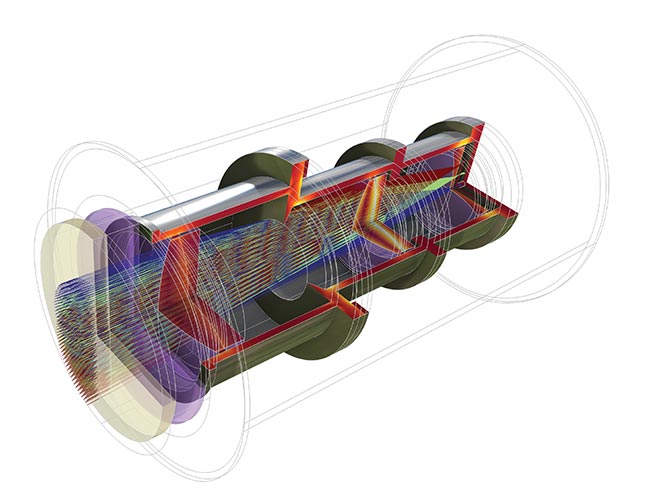
Courtesy of COMSOL.
Optimizing the alignment between a simulation and the real world requires engineers to account for all the physics phenomena that influence the optical behavior of a device. Traditionally, such multiphysics modeling has been conducted by engineers who have a strong understanding of modeling workflows and the expertise necessary to fine-tune the setup of a model and evaluate its results.
However, by creating a simulation app based on a model — with custom-controlled inputs and outputs in an intuitive user interface — and then distributing the app to colleagues, modeling experts can extend access to simulation, thereby streamlining the design workflow. To boost design efficiency even further, simulation engineers can incorporate surrogate functionality to approximate model behavior when creating apps.
Using apps to overcome design challenges
Relying on a small team of simulation experts can create bottlenecks in the design process. At the same time, devoting time and resources to train engineers to build models from the ground up — and then troubleshoot, debug, and analyze them
effectively — poses its own challenges.
Easy-to-use customizable simulation apps offer a practical solution to this dilemma. The feature set of an app can be simplified to include only the precise functionality that specific users require, enabling project stakeholders who do not regularly use modeling and simulation to extract model results with the same confidence as a seasoned simulation expert. For example, a laser cavity model might necessitate many input parameters — but if an app based on this model were built for an engineer focused solely on the laser cavity’s thermal aspects, it would only include settings for modifying the parameters that influence the thermodynamics.
Having convenient access to apps via web browsers, mobile devices, and stand-alone compiled files allows simulation results to be accessible wherever engineers need them, such as on the factory floor or in the field. It also enables multiple teams operating anywhere in the world to work in concert on the same project; for example, one designer can focus on testing the performance of an image sensor while another optimizes the performance of an aperture. An app dedicated to each purpose can be distributed to each designer, and the data generated by the apps can be exchanged between them and shared with the simulation expert and even customers.
Simulation apps can also increase the efficiency of testing, a necessary but often time-consuming and expensive design task. An app created for testing can be used repeatably, ensuring that users save time and costs while preserving vital institutional knowledge.
Surrogate models and simulation data
The addition of surrogate-model-based functionality can further improve the
effectiveness of an app. A surrogate model must first be created from a full model, but the payoff for this upfront investment of work and time is considerable. Design iteration and analysis with an app powered by a surrogate model is significantly less computationally demanding and provides results within milliseconds.
Figure 1 shows a workflow for surrogate model integration, where the initial step is using the COMSOL Multiphysics software to generate simulation data. The surrogate model is trained on this simulation data, and it can ultimately be used as a replacement for the full model evaluation. A design engineer can then use the app to rapidly explore a design space or process. Once optimal parameters are obtained, there is value in rerunning the full finite element model to validate the surrogate model results and achieve additional certainty.
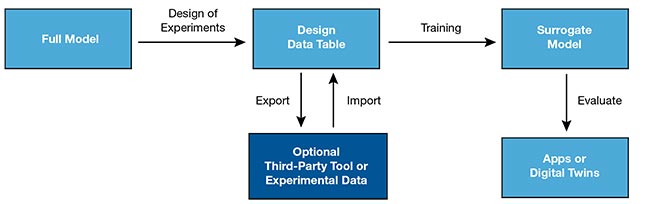
Figure 1. The process of creating an app or digital twin using the surrogate model approach, where simulation data is derived from a full finite element method (FEM) model. Courtesy of COMSOL.
Surrogate models can also be used in digital twins. A digital twin differs from a traditional model in that it is tightly coupled to the latest sensor data about a specific device. An engineer or user may have a full simulation model of a specific component, but once the design has been fabricated, the user may need the model to account for additional factors such as the material properties of a specific batch from a supplier. Based on need, digital twins can be created for components from different batches, or for each individual component, depending on additional considerations. Each digital twin re-creates the behavior of that specific component based on the best and most recent available data. Multiple digital twins of different components that work together can be used to simulate accurate system-level behavior that reflects the underlying state of their constituent parts.
Using surrogate models or digital twins is not always the optimal simulation approach. For example, for “one-off” models, the overhead required to create
a surrogate model or digital twin may not be justified. Therefore, engineers should consider the needs of their design and
the project timeline and goals before choosing which simulation tools, if any, to use.
Additionally, machine learning techniques are neither a direct replacement for design teams nor a way to bypass crucial aspects of a design process. If there is an error in the coding, an app will not be able to naturally correct itself. Rather, apps and surrogate models should be viewed as computational tools that enable teams to save resources while keeping the human mind at the center of innovation.
Apps in action
The ease-of-use benefits and design freedom(s) that apps can unlock is a powerful combination: Engineers are taking advantage, tailoring simulation apps to aid in the design of advanced and even novel components.
Yet simulation apps are equally effective tools to optimize the design process of mainstay optical components such as filters. With the Application Builder functionality in COMSOL Multiphysics, for example, a user can customize an app for color filter design to perform two distinct functions. A first function is to predict the color of light transmitted through a prescribed color filter under white light illumination. Its aim is to solve the “forward” problem, wherein the app user provides the input parameters, such as material properties and geometry specifications. When the user modifies these parameters, the results will immediately be updated using a surrogate model, which, in this case, will be a trained deep neural network. The app will also include functionality that allows the user to solve the full finite element method (FEM) model to confirm the prediction from the surrogate.
The app’s second function will solve the “inverse” problem, which is often of greater interest to design engineers and consumers. The user can provide the wavelength that they would like the filter to transmit, and the surrogate-model-based app will determine the necessary design parameters to achieve that output. Identifying these parameters is a nontrivial problem, solved by optimizing the inputs to the surrogate model. Once the surrogate-model-based approach has generated suggested parameters for the desired color, these parameters can be used as input to the forward problem, providing the app user with additional confirmation of their accuracy.
Microstrip patch antenna performance
Faster delivery of results is a tangible outcome of using a deep neural network-trained surrogate model app instead of a full FEM simulation. For example, such an app can provide estimates of the performance of a microstrip patch antenna. These compact and cost-effective components are widely deployed at microwave frequencies to enable robust mobile communications in aerospace and defense and consumer applications.
The microstrip patch antenna app shown in Figure 2 delivers estimates by first examining the patch length, tuning stub length, and the dielectric constant of the substrate. Then, the surrogate model quickly updates the antenna S-parameter, near and far fields, and other results for the chosen input parameters. The deep neural network training for the surrogate model was performed for each quantity of interest. Other parameters — the learning rate, weight decay, and batch size — were tuned to minimize validation loss.
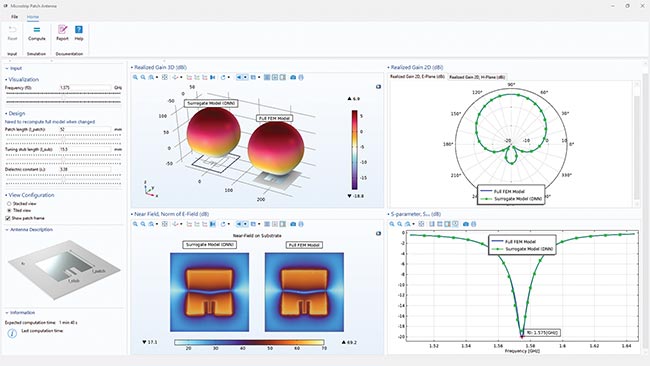
Figure 2. The antenna app user interface. The design parameters are shown, along with comparisons between the surrogate model and FEM model results.. Courtesy of COMSOL.
Similar to the color filter example, the patch antenna app also simulates an FEM model to confirm the surrogate model predictions. In this case, it uses an adaptive frequency sweep to quickly calculate broadband S-parameters. The app user interface shows the surrogate model and FEM-based model side by side. The results show model performance and highlight how the surrogate model offers faster design iteration using arbitrary inputs than the FEM model.
A real-world use case
One area where optics-based apps are finding use in the real world is in the development of particle accelerators. For example, teams at RadiaSoft and Argonne National Laboratory collaborated to create an app that streamlines the design of synchrotron vacuum chambers and can be used to improve the brightness of the synchrotron beams (Figure 3). The app is based on a multiphysics vacuum chamber model, and the propagation of synchrotron radiation is analyzed using ray optics simulation.
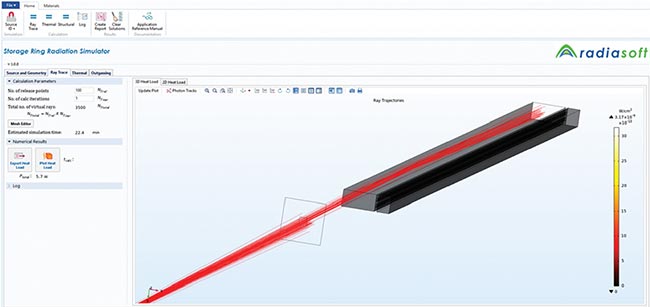
Figure 3. The app built by RadiaSoft and Argonne National Laboratory, showing synchrotron radiation ray tracing in a vacuum chamber. Courtesy of RadiaSoft.
With this app, users can define parameters, such as the electron beam source and the strength of the dipole magnets, and then visualize the resulting rays’ path and power as well as the chamber’s temperature. These results can help particle accelerator engineers determine how the radiation power distribution changes due to beam behavior.
Users can also easily calculate gas desorption and power with the app. Achieving sufficient beam lifetime requires maintaining the vacuum pressure, which itself requires engineers to determine the amount of gas desorption from the chamber walls. When users import a flux profile into the app, it automatically computes how much gas consequently escapes and provides the material properties.
The app has been distributed to particle accelerator facilities worldwide, and feedback from those in the field has
allowed the engineering team to customize the app’s interface based on user needs. Importantly, team members without simulation expertise can use the app to perform calculations without digging into the underlying model themselves, thereby avoiding any reliance on the engineer who created the original code.
The future of integration
As optics and photonics engineers increasingly adopt modeling and simulation, they are driving innovation in the many industries that benefit from advanced imaging, communications,
and optical fiber systems, among other applications. By integrating simulation apps, surrogate models, and digital twins into this work, teams are accelerating design iteration and analysis, achieving better accuracy by incorporating real-time model feedback. And they are placing simulation into the hands of team members who need it, regardless of their modeling expertise.
Of course, individual organizations must test the feasibility of integrating these simulation tools into their workflows and evaluate which simulation method makes the most sense on a case-by-case basis. Fortunately, simulation apps — including those that use surrogate models and digital twins — have unlimited potential in the optics and photonics space.
Meet the author
Andrew Strikwerda is a lead application engineer at COMSOL, specializing in electromagnetics. He previously served as a senior staff scientist at the Johns Hopkins University Applied Physics Laboratory. Strikwerda conducted postgraduate research at the Technical University of Denmark; email:
andrew.strikwerda@comsol.com.